In this step, you will create a custom installation page (iparams) with 2 fields:
- freshdeskDomain (example: yourcompany.freshdesk.com)
- freshdeskApi (Freshdesk API key)
Keep it simple. Create these 3 files and use the code below.
Create iparams HTML
File path: config/iparams.html
<!-- config/iparams.html -->
<!DOCTYPE html>
<html lang="en">
<head>
  <meta charset="UTF-8" />
  <meta name="viewport" content="width=device-width, initial-scale=1.0" />
  <link rel="stylesheet" href="https://static.freshdev.io/configs/v3/freshapps-dependency-bundle.css" />
  <script src="{{{appclient}}}"></script>
  <title>Installation parameters</title>
</head>
<body>
  <div id="root"></div>
  <script type="module" src="./assets/components/main.jsx"></script>
</body>
</html>
Create main React entry
File path: config/assets/components/main.jsx
import React, { useState } from 'react';
import ReactDOM from 'react-dom/client';
import '@freshworks/crayons/css/crayons-min.css';
import Iparam from './Iparam';

const App = () => {
  const [child, setChild] = useState(<h3>Loading installation page...</h3>);

  window.app.initialized().then((client) => {
    window.client = client;
    setChild(<Iparam />);
  });

  return <div>{child}</div>;
};

ReactDOM.createRoot(document.getElementById('root')).render(
  <React.StrictMode>
    <App />
  </React.StrictMode>
);
Create Iparam component
File path: config/assets/components/Iparam.jsx
import { useState } from 'react';
import { FwInlineMessage, FwInput, FwLabel } from '@freshworks/crayons/react';

const Iparam = () => {
  const [data, setData] = useState({
    freshdeskDomain: '',
    freshdeskApi: '',
  });

  const [error, setError] = useState('');

  const getConfigs = (configs = {}) => {
    setData({
      freshdeskDomain: configs?.freshdeskDomain || '',
      freshdeskApi: configs?.freshdeskApi || '',
    });
  };

  const postConfigs = () => ({
    freshdeskDomain: data.freshdeskDomain.trim(),
    freshdeskApi: data.freshdeskApi.trim(),
  });

  const validate = () => {
    if (!data.freshdeskDomain.trim()) {
      setError('Freshdesk domain is required');
      return false;
    }
    if (!data.freshdeskApi.trim()) {
      setError('Freshdesk API key is required');
      return false;
    }
    setError('');
    return true;
  };

  window.getConfigs = getConfigs;
  window.postConfigs = postConfigs;
  window.validate = validate;

  return (
    <div style={{ padding: 16 }}>
      <FwLabel value="Freshdesk connection" color="normal" />

      {error ? (
        <FwInlineMessage open type="error" closable={false}>{error}</FwInlineMessage>
      ) : (
        <FwInlineMessage open type="info" closable={false}>
          Add your Freshdesk domain and API key.
        </FwInlineMessage>
      )}

      <div style={{ display: 'flex', flexDirection: 'column', gap: 12, marginTop: 12 }}>
        <FwInput
          label="Freshdesk domain"
          placeholder="yourcompany.freshdesk.com"
          value={data.freshdeskDomain}
          onFwInput={(e) => setData((prev) => ({ ...prev, freshdeskDomain: e.target.value || '' }))}
        />

        <FwInput
          label="Freshdesk API key"
          type="password"
          value={data.freshdeskApi}
          onFwInput={(e) => setData((prev) => ({ ...prev, freshdeskApi: e.target.value || '' }))}
        />
      </div>
    </div>
  );
};

export default Iparam;
Create request templates
Request templates let your app call Freshdesk APIs without exposing secrets in front-end code. The platform injects iparam values at runtime.
File path: config/requests.json
{
  "getTickets": {
    "schema": {
      "method": "GET",
      "protocol": "https",
      "host": "<%= current_host.endpoint_urls.freshdesk %>",
      "path": "/api/v2/tickets",
      "headers": {
        "Content-Type": "application/json",
        "Authorization": "Basic <%= encode(iparam.freshdeskApi + ':X') %>"
      }
    },
    "options": { "retryDelay": 1000 }
  },
  "createTicket": {
    "schema": {
      "method": "POST",
      "protocol": "https",
      "host": "<%= current_host.endpoint_urls.freshdesk %>",
      "path": "/api/v2/tickets",
      "headers": {
        "Content-Type": "application/json",
        "Authorization": "Basic <%= encode(iparam.freshdeskApi + ':X') %>"
      }
    },
    "options": { "retryDelay": 1000 }
  },
  "deleteTicket": {
    "schema": {
      "method": "DELETE",
      "protocol": "https",
      "host": "<%= current_host.endpoint_urls.freshdesk %>",
      "path": "/api/v2/tickets/<%= context.ticketId %>",
      "headers": {
        "Content-Type": "application/json",
        "Authorization": "Basic <%= encode(iparam.freshdeskApi + ':X') %>"
      }
    },
    "options": { "retryDelay": 1000 }
  }
}
A few things to note:
- current_host.endpoint_urls.freshdesk resolves to the installed Freshdesk domain automatically.
- iparam.freshdeskApi pulls the API key saved during installation. Never hard-coded.
- context.* values (like context.ticketId) are passed at call time from your React code.
Declare requests in manifest
Add a requests object to the common module so the platform knows about your templates.
File path: manifest.json
{
  "platform-version": "3.0",
  "modules": {
    "common": {
      "location": {
        "full_page_app": {
          "url": "index.html",
          "icon": "icon.svg"
        }
      },
      "requests": {
        "getTickets": {},
        "createTicket": {},
        "deleteTicket": {}
      }
    },
    "support_ticket": {}
  },
  "metaConfig": {
    "framework": "react"
  },
  "engines": {
    "node": "24.11.1",
    "fdk": "10.1.0"
  }
}
Run and fill values
Start local dev:
fdk runOpen:
http://localhost:10001/custom_configs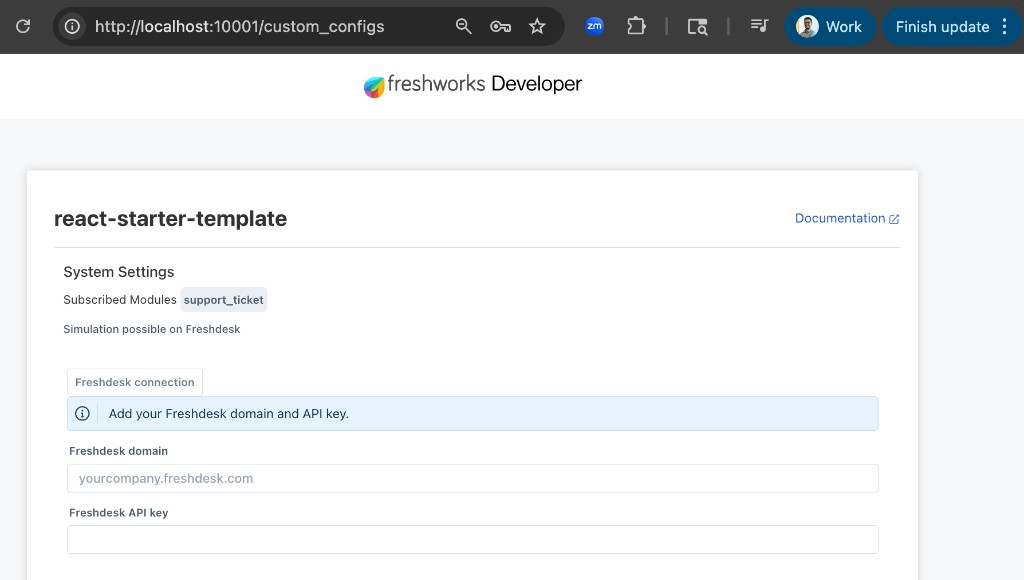
Fill and save:
- Freshdesk domain: yourcompany.freshdesk.com
- Freshdesk API key: from Freshdesk Profile settings
Validate
fdk validateIf validation passes, continue to the next section.
ReferenceSuperstack has a much larger requests.json covering tickets, contacts, companies, and more. See: config/requests.json, config/iparams.html, Iparam.jsx.