Your app already ships with a full page (full_page_app). In this step you will do two things:
- Add Crayons UI to the full page app and call your request templates.
- Add a second UI placeholder, the ticket sidebar, which appears on the right side of an individual ticket in Freshdesk.
Add Crayons UI to the full page app
In the previous step, you created request templates in config/requests.json. Now you will use those templates from React using client.request.invokeTemplate, and you will render the UI with Crayons so it matches the Freshdesk look and feel.
You will build a simple ticket CRUD screen. This UI runs on the full page placeholder that opens from Apps in Freshdesk.
File path: app/components/FullPage.jsx
import { useCallback, useEffect, useState } from 'react';
import {
  FwButton,
  FwInlineMessage,
  FwInput,
  FwTextarea,
} from '@freshworks/crayons/react';

export default function FullPage() {
  const [tickets, setTickets] = useState([]);
  const [busy, setBusy] = useState(false);
  const [error, setError] = useState('');
  const [freshdeskDomain, setFreshdeskDomain] = useState('');
  const [subject, setSubject] = useState('Support needed');
  const [email, setEmail] = useState('customer@example.com');
  const [description, setDescription] = useState('Created from the React tutorial');
  const [deleteId, setDeleteId] = useState('');

  const styles = {
    page: { padding: 28, maxWidth: 980, margin: '0 auto', fontFamily: 'system-ui, -apple-system, Segoe UI, Roboto, sans-serif' },
    header: {
      display: 'flex',
      alignItems: 'baseline',
      justifyContent: 'space-between',
      gap: 12,
      marginBottom: 16,
    },
    title: { margin: 0, fontSize: 28, fontWeight: 800, letterSpacing: '-0.02em' },
    subtitle: { margin: '6px 0 0', color: '#64748b', fontSize: 13 },
    grid: { display: 'grid', gridTemplateColumns: '1fr 1fr', gap: 16, marginTop: 16 },
    card: {
      border: '1px solid #e2e8f0',
      borderRadius: 12,
      background: '#ffffff',
      padding: 16,
      boxShadow: '0 1px 0 rgba(15, 23, 42, 0.02)',
    },
    cardTitleRow: { display: 'flex', alignItems: 'center', justifyContent: 'space-between', gap: 12, marginBottom: 12 },
    cardTitle: { margin: 0, fontSize: 16, fontWeight: 700 },
    help: { margin: 0, color: '#64748b', fontSize: 12 },
    row: { display: 'flex', gap: 10, alignItems: 'end' },
    list: { margin: '10px 0 0', paddingLeft: 18 },
    link: { color: '#0f172a', textDecoration: 'none' },
    linkHover: { textDecoration: 'underline' },
    empty: { color: '#64748b', fontSize: 13, marginTop: 8 },
  };

  const listTickets = useCallback(async () => {
    setBusy(true);
    setError('');
    try {
      const res = await window.client.request.invokeTemplate('getTickets', {
        context: { per_page: '10', page: '1' },
      });
      setTickets(JSON.parse(res.response) || []);
    } catch (e) {
      setError(e?.message || 'Could not list tickets');
    } finally {
      setBusy(false);
    }
  }, []);

  useEffect(() => {
    listTickets();
  }, [listTickets]);

  useEffect(() => {
    (async () => {
      try {
        const d = await window.client.iparams.get('freshdeskDomain');
        setFreshdeskDomain((d || '').trim());
      } catch {
        setFreshdeskDomain('');
      }
    })();
  }, []);

  const toTicketUrl = (ticketId) => {
    if (!freshdeskDomain) return '';
    const host = freshdeskDomain.replace(/^https?:\/\//, '').replace(/\/+$/, '');
    return `https://${host}/a/tickets/${ticketId}`;
  };

  const createTicket = async () => {
    setBusy(true);
    setError('');
    try {
      await window.client.request.invokeTemplate('createTicket', {
        body: JSON.stringify({
          subject,
          email,
          description,
          status: 2,
          priority: 1,
        }),
      });
      window.client.interface.trigger('showNotify', {
        type: 'success',
        message: 'Ticket created',
      });
      await listTickets();
    } catch (e) {
      setError(e?.message || 'Could not create ticket');
    } finally {
      setBusy(false);
    }
  };

  const deleteTicket = async () => {
    if (!deleteId) return;
    setBusy(true);
    setError('');
    try {
      await window.client.request.invokeTemplate('deleteTicket', {
        context: { ticketId: deleteId },
      });
      setDeleteId('');
      await listTickets();
    } catch (e) {
      setError(e?.message || 'Could not delete ticket');
    } finally {
      setBusy(false);
    }
  };

  return (
    <main style={styles.page}>
      <header style={styles.header}>
        <div>
          <h1 style={styles.title}>Ticket CRUD</h1>
          <p style={styles.subtitle}>
            Create, list, and delete tickets using request templates. This page runs in the Freshdesk full page placeholder.
          </p>
        </div>
        <FwButton color="secondary" disabled={busy} onFwClick={listTickets}>
          {busy ? 'Refreshing…' : 'Refresh'}
        </FwButton>
      </header>

      {error && (
        <FwInlineMessage open type="error" onFwHide={() => setError('')}>
          {error}
        </FwInlineMessage>
      )}

      <div style={styles.grid}>
        <section style={styles.card}>
          <div style={styles.cardTitleRow}>
            <h2 style={styles.cardTitle}>Create a ticket</h2>
            <p style={styles.help}>Creates a ticket via the `createTicket` request template.</p>
          </div>
          <div style={{ display: 'grid', gap: 10, gridTemplateColumns: '1fr 1fr' }}>
            <FwInput label="Subject" value={subject} onFwInput={(e) => setSubject(e.target.value)} />
            <FwInput label="Requester email" value={email} onFwInput={(e) => setEmail(e.target.value)} />
          </div>
          <div style={{ marginTop: 10 }}>
            <FwTextarea
              label="Description"
              rows={3}
              value={description}
              onFwInput={(e) => setDescription(e.target.value)}
            />
          </div>
          <div style={{ marginTop: 10, display: 'flex', gap: 10, alignItems: 'center' }}>
            <FwButton color="primary" disabled={busy} onFwClick={createTicket}>
              {busy ? 'Working…' : 'Create ticket'}
            </FwButton>
            <span style={styles.help}>A toast appears after a successful create.</span>
          </div>
        </section>

        <section style={styles.card}>
          <div style={styles.cardTitleRow}>
            <h2 style={styles.cardTitle}>Delete a ticket</h2>
            <p style={styles.help}>Deletes a ticket via the `deleteTicket` request template.</p>
          </div>
          <div style={styles.row}>
            <FwInput
              label="Ticket id"
              placeholder="e.g. 1130002106531"
              value={deleteId}
              onFwInput={(e) => setDeleteId(e.target.value)}
            />
            <FwButton color="danger" disabled={busy || !deleteId} onFwClick={deleteTicket}>
              {busy ? 'Working…' : 'Delete'}
            </FwButton>
          </div>
          <p style={{ ...styles.help, marginTop: 10 }}>
            Tip: You can copy a ticket id from the Recent tickets list.
          </p>
        </section>
      </div>

      <section style={{ ...styles.card, marginTop: 16 }}>
        <div style={styles.cardTitleRow}>
          <h2 style={styles.cardTitle}>Recent tickets</h2>
          <p style={styles.help}>
            {freshdeskDomain ? 'Click a ticket to open it in Freshdesk.' : 'Add `freshdeskDomain` in iparams to enable links.'}
          </p>
        </div>
        {tickets.length === 0 ? (
          <div style={styles.empty}>{busy ? 'Loading tickets…' : 'No tickets yet. Create one above.'}</div>
        ) : (
          <ul style={styles.list}>
            {tickets.map((t) => {
              const href = toTicketUrl(t.id);
              return (
                <li key={t.id}>
                  {freshdeskDomain ? (
                    <a
                      href={href}
                      target="_blank"
                      rel="noreferrer"
                      style={styles.link}
                      onMouseEnter={(e) => (e.currentTarget.style.textDecoration = styles.linkHover.textDecoration)}
                      onMouseLeave={(e) => (e.currentTarget.style.textDecoration = styles.link.textDecoration)}
                    >
                      <strong>#{t.id}</strong> {t.subject}
                    </a>
                  ) : (
                    <>
                      <strong>#{t.id}</strong> {t.subject}
                    </>
                  )}
                </li>
              );
            })}
          </ul>
        )}
      </section>
    </main>
  );
}
Now render this component on the full page surface and load Crayons CSS.
File path: app/components/Main.jsx
import React, { useState, useEffect } from 'react';
import FullPage from './FullPage';
import { createRoot } from 'react-dom/client';
import '@freshworks/crayons/css/crayons-min.css';
import '../styles/style.css';

const Main = () => {
  const [child, setChild] = useState(<h3>App is loading</h3>);

  useEffect(() => {
    window.app.initialized().then((client) => {
      window.client = client;
      setChild(<FullPage />);
    });
  }, []);

  return <div>{child}</div>;
};

const container = document.getElementById('root');
const root = createRoot(container);

root.render(
  <React.StrictMode>
    <Main />
  </React.StrictMode>
);
Preview the full page app
Turn on local dev mode, then open your app from the Apps menu.
- Open Freshdesk and append ?dev=true to the URL.
- Open Apps -> your app. The full page app loads with your Ticket CRUD UI.
Example:
https://yourcompany.freshdesk.com/a/tickets?dev=true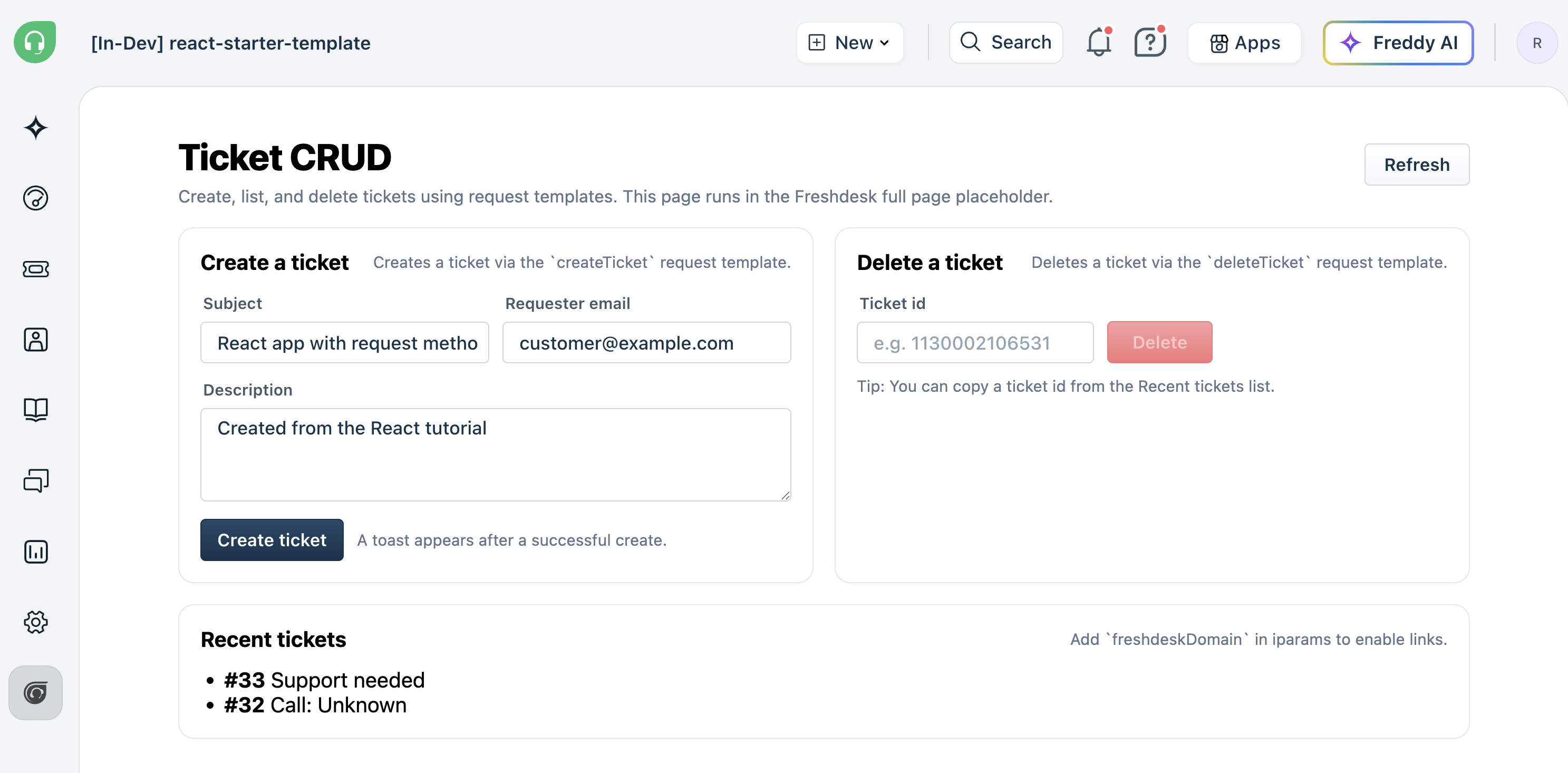
Create ticketSidebar.html
Every placement needs its own HTML entry file. Create one for the sidebar.
File path: app/ticketSidebar.html
<!DOCTYPE html>
<html lang="en">
<head>
  <meta charset="UTF-8" />
  <meta name="viewport" content="width=device-width, initial-scale=1.0" />
  <script src="{{{appclient}}}"></script>
  <title>Ticket sidebar</title>
</head>
<body>
  <div id="root"></div>
  <script type="module" src="./components/placeholders/ticketSidebar.jsx"></script>
</body>
</html>
Create the ticket sidebar component
The ticket sidebar component fetches the ticket that is currently open, displays its status and priority, and provides buttons to update those fields from inside Freshdesk.
File path: app/components/placeholders/ticketSidebar.jsx
import React, { useState, useEffect } from 'react';
import ReactDOM from 'react-dom/client';
import '@freshworks/crayons/css/crayons-min.css';
import { FwButton } from '@freshworks/crayons/react';

const statusMap = { 2: 'Open', 3: 'Pending', 4: 'Resolved', 5: 'Closed' };
const priorityMap = { 1: 'Low', 2: 'Medium', 3: 'High', 4: 'Urgent' };

function TicketSidebar() {
  const [ticket, setTicket] = useState(null);
  const [loading, setLoading] = useState(true);

  useEffect(() => {
    loadTicket();
  }, []);

  const loadTicket = async () => {
    setLoading(true);
    try {
      const data = await window.client.data.get('ticket');
      setTicket(data.ticket);
    } catch (e) {
      console.error('Could not load ticket', e);
    } finally {
      setLoading(false);
    }
  };

  const setStatus = async (value) => {
    try {
      await window.client.interface.trigger('setValue', { id: 'status', value });
      setTicket((prev) => ({ ...prev, status: value }));
      window.client.interface.trigger('showNotify', {
        type: 'success',
        message: 'Status updated',
      });
    } catch (e) {
      window.client.interface.trigger('showNotify', {
        type: 'warning',
        message: 'Could not update status',
      });
    }
  };

  const setPriority = async (value) => {
    try {
      await window.client.interface.trigger('setValue', { id: 'priority', value });
      setTicket((prev) => ({ ...prev, priority: value }));
      window.client.interface.trigger('showNotify', {
        type: 'success',
        message: 'Priority updated',
      });
    } catch (e) {
      window.client.interface.trigger('showNotify', {
        type: 'warning',
        message: 'Could not update priority',
      });
    }
  };

  if (loading) return <p>Loading ticket...</p>;
  if (!ticket) return <p>No ticket data available.</p>;

  return (
    <div style={{ padding: 12, fontFamily: 'sans-serif', fontSize: 13 }}>
      <h3 style={{ margin: 0 }}>#{ticket.id}</h3>
      <p>{ticket.subject || 'No subject'}</p>

      <div style={{ marginBottom: 16 }}>
        <strong>Status:</strong> {statusMap[ticket.status] || ticket.status}
        <br />
        <strong>Priority:</strong> {priorityMap[ticket.priority] || ticket.priority}
      </div>

      <div style={{ marginBottom: 12 }}>
        <p style={{ fontWeight: 600, marginBottom: 6 }}>Set Status</p>
        <div style={{ display: 'flex', gap: 6, flexWrap: 'wrap' }}>
          {Object.entries(statusMap).map(([val, label]) => (
            <FwButton
              key={val}
              size="small"
              color={ticket.status === Number(val) ? 'primary' : 'secondary'}
              onFwClick={() => setStatus(Number(val))}
            >
              {label}
            </FwButton>
          ))}
        </div>
      </div>

      <div>
        <p style={{ fontWeight: 600, marginBottom: 6 }}>Set Priority</p>
        <div style={{ display: 'flex', gap: 6, flexWrap: 'wrap' }}>
          {Object.entries(priorityMap).map(([val, label]) => (
            <FwButton
              key={val}
              size="small"
              color={ticket.priority === Number(val) ? 'primary' : 'secondary'}
              onFwClick={() => setPriority(Number(val))}
            >
              {label}
            </FwButton>
          ))}
        </div>
      </div>
    </div>
  );
}

function Root() {
  const [ready, setReady] = useState(false);

  useEffect(() => {
    window.app.initialized().then((client) => {
      window.client = client;
      setReady(true);
    });
  }, []);

  if (!ready) return <p>Loading...</p>;
  return <TicketSidebar />;
}

ReactDOM.createRoot(document.getElementById('root')).render(<Root />);
Three platform APIs make this possible:
| API | What it does |
|---|---|
| client.data.get('ticket') | Returns the ticket that is currently open in Freshdesk |
| client.interface.trigger('setValue', ...) | Updates a ticket field such as status, priority, or type |
| client.interface.trigger('showNotify', ...) | Displays a toast notification inside the Freshdesk UI |
Update manifest.json
Register the new placement so the platform knows where to load it. Under modules, add support_ticket.location.ticket_sidebar:
"support_ticket": {
  "location": {
    "ticket_sidebar": {
      "url": "ticketSidebar.html",
      "icon": "icon.svg"
    }
  }
}
Subscribe to modules (local dev)
With fdk run running, open http://localhost:10001/system_settings and subscribe to both common and support_ticket. Enter your Freshdesk account URL (for example https://yourcompany.freshdesk.com) and click Continue.
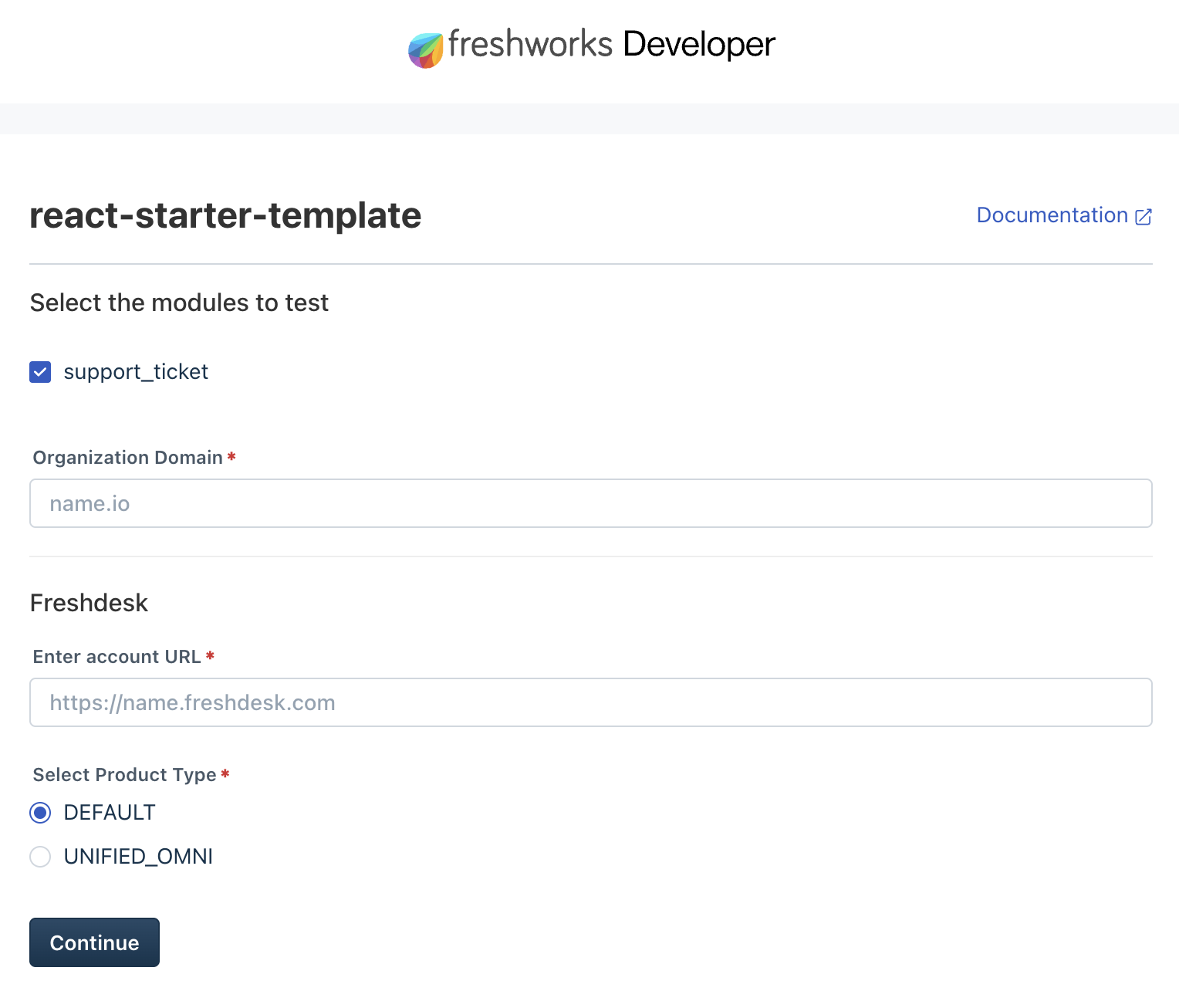 System settings page where you subscribe to modules for local testing
Preview in Freshdesk
Full page app: turn on local dev mode, then open your app from the Apps menu on the left sidebar.
- Open Freshdesk and append ?dev=true to the URL.
Example:
https://yourcompany.freshdesk.com/a/tickets?dev=trueTicket sidebar: open any ticket and append ?dev=true to the URL.
Example:
https://yourcompany.freshdesk.com/a/tickets/1?dev=true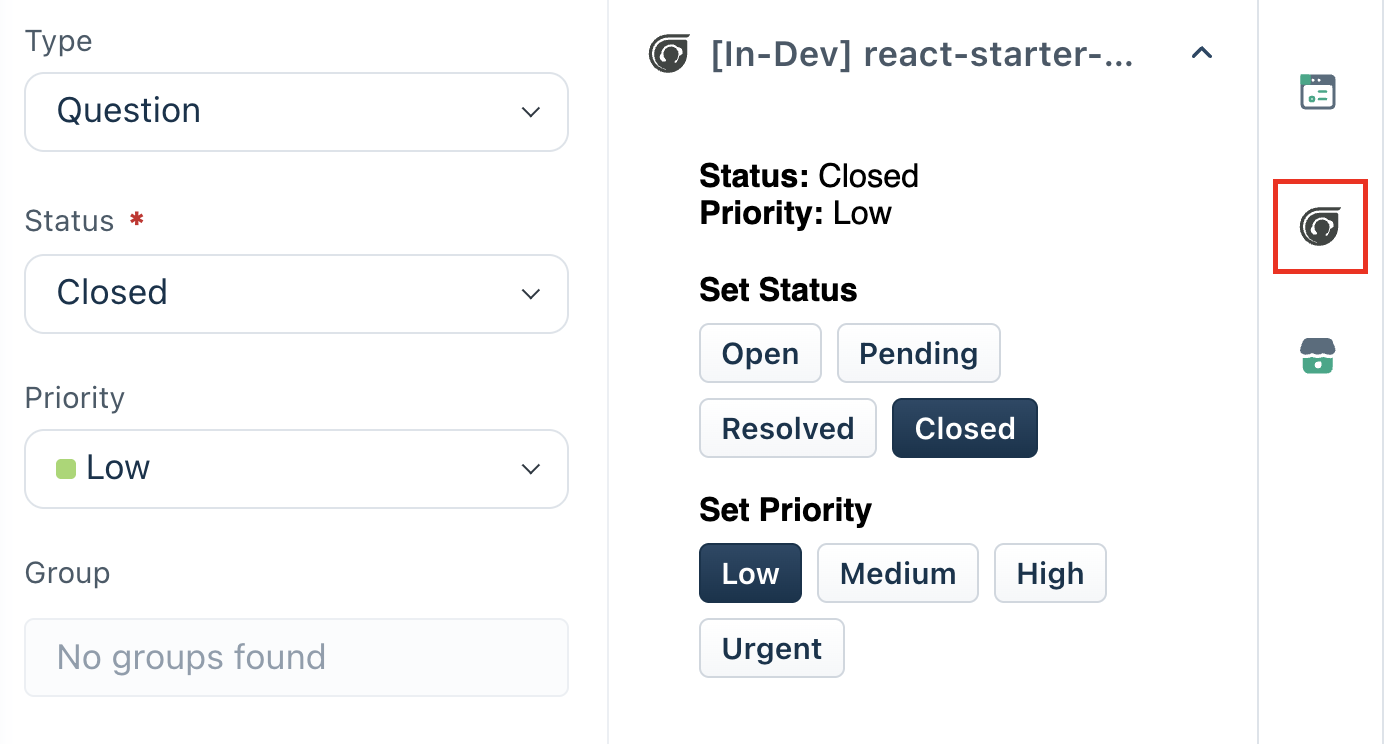
Validate
fdk validateIf validation passes with zero platform errors, you are ready for the next step.
ReferenceSuperstack's ticket sidebar includes event listeners, instance communication, and server method invocation on top of what you built here. See: ticketSidebar.jsx.